



Curated Content

Caching

Modern Caching Techniques for High-Performance Web Apps

In the web development world, modern caching techniques have become indispensable to build high performance web applications. It’s operations like…

blockchain technology

Exploring the Intersection of Blockchain and Web Development

Blockchain technology and web development are converging in an exciting new frontier that will change the way we use digital…

Docker to Kubernetes Migration

Docker to Kubernetes: A Practical Migration Checklist for Dev Teams

Are you ready to take your app from local containers to cloud-native work? If yes, you need to know that…

How Platform Engineering Helps Scale

Platform Engineering: Building Internal Developer Platforms (IDPs) That Scale

Have you noticed how “Platform Engineering” is everywhere lately? You may hear it in meetings or even see it in…

DevOps

The Evolution of CI/CD: A Guide for 2025 DevOps

Continuous Integration and Continuous Delivery (CI/CD) has been a game-changer in the world of software development, especially within the DevOps…

Top of the Week

Latest Insights

Modern Caching Techniques for High-Performance Web Apps

Caching

In the web development world, modern caching techniques have become indispensable to build high performance web applications. It’s operations like these that contribute to caching and help reduce latency, improve load times, and contribute towards increasing user experience by enabling the storage of frequently accessed data in copies — otherwise called cache. In this article we will explore different caching strategies that developers can use to improve the performance of their web applications.

1. Understanding Caching

Storing data in temporary storage so that on subsequent requests data can be accessed faster is caching. However, if you have static images, stylesheets, scripts etc then your browser can cache them. Because of this, the browser will load these resources from its local cache on subsequent visits rather than downloading them again from the server, which makes the page render much faster.

2. Browser Caching

Browser caching is one of the basic techniques that relies on web browsers to store static files. Developers can dictate how long to cache specific resources by setting appropriate HTTP headers such as Cache-Control and Expires. For instance, static assets that do not change very often could have a long cache duration, whereas dynamic content might need a cache duration shorter than that to display the most recent data to the users.

3. Server-Side Caching

Another important strategy here is server-side caching: storing data on the server so as not to overload the databases anymore, and shorten the response time. Several methods exist for implementing server-side caching:

Content Delivery Networks (CDNs)

Dynamic Page Caching

Cached content is distributed across many geographically dispersed servers. CDNs help reduce latency and improve performance by serving content from a place near the user. This is very useful for sites with a global audience so that they load faster no matter where the user is located.

Reverse Proxies

Varnish Cache, and other reverse proxies, sit in the middle between the client and the server. If cached content is available they intercept requests and serve it directly without the need for repeated database queries. This approach not only reduces response time but also relieves the origin server pressure.

Dynamic Page Caching

Dynamic page caching enables developers to cache entire pages or parts of pages temporarily, for applications with dynamic content. This page cache technique provides cached version of pages until data changes under and the delta between performance and freshness is here…

4. Fragment Caching

Fragment caching is all about caching parts of the page instead of the whole page. In applications where some elements are more often changed than others, like user specific sections or frequently used sidebars, this method is useful. By forcing developers to cache only these fragments, dynamic content isn’t lost while performance is optimized.

5. Distributed Caching

Distributed caching is required in the case of high traffic volumes in an environment where several servers are serving these requests. With this method, we utilize consistent hashing algorithms to spread cached data across many nodes, one hop apart. It partitions the entire cache space across each node and is able to retrieve data efficiently without overloading any single server.

6. Micro Caching

Micro Caching

Micro caching is when you cache responses for very short periods (often just a few seconds) to deal with high traffic scenarios. This is a very useful method for content that changes often, but can still take advantage of temporary storage to relieve server load during peak times. You can see this commonly used on directories such as rub rankings and craigslist or other high traffic web apps that require serving many different results quickly.

7. Best Practices for Caching

To maximize the effectiveness of caching strategies, developers should adhere to several best practices:

  • Review and adjust cache expiration settings regularly, according to how volatile content is.
  • Keep monitoring your cache hit ratios to find ways of optimization.
  • Version static assets so that users get the latest files when they need to.
  • Multiple strategies for caching are combined and make a complete solution fit for the application requirements.

Conclusion

In today’s digital landscape, modern caching techniques are important to develop high performance web applications. Browser caching, server side strategies including CDNs and reverse proxies and methods like fragment and distributed caching can be utilised by developers to greatly improve user experience and resource utilisation. As web applications keep growing, knowing these caching techniques is going to be crucial in providing fast and responsive user experiences in 2025 and onwards.

Exploring the Intersection of Blockchain and Web Development

blockchain technology

Blockchain technology and web development are converging in an exciting new frontier that will change the way we use digital platforms. The convergence of both fields allows for the creation of secure, decentralized applications that improve user experience as both fields advance. In this article we will discuss how blockchain and web development can work in synergy, we will examine some of the key features and benefits and we will also discuss some of the trends that we can expect to see in the future.

Understanding Blockchain Technology

Blockchain is a distributed ledger technology that makes sure all transactions are securely recorded across a network of computer. Lacking a centralized authority, it promotes the transparency and trust among users. Every transaction is encrypted and tied to prior ones in an unalterable chain of data that is nearly impossible to alter. The feature of this security makes Blockchain very popular with those applications that act with sensitive information like financial transaction or personal data.

The Role of Web Development

Web development involves the process of developing websites and applications to interact with web content for a user. Involves several technologies and frameworks that help developers to build responsive, user friendly platforms. With web development evolving, it’s possible to include best in class technologies such as blockchain for even more functionality and security, thus providing users with a richer online experience.

Decentralized Applications (DApps)

Decentralized Applications (DApps)

Decentralized applications (DApps) are one of the most important developments at the intersection of blockchain and web development. DApps don’t run on centralized servers like traditional applications, instead, they run on a peer to peer network using blockchain technology. The result of decentralization enables the users to have more control over their interactions and data. For example, social media platforms built on DApps allow users to own and use their content, instead of surrendering to a centralized entity.

Smart Contracts

Another innovative feature coming out of the fusion of blockchain and web development is smart contracts. These self-executing contracts are written in code, with the terms written directly into them, and they automatically enforce agreements when certain conditions are met. Smart contracts eliminate intermediaries which means that they can be used for payments or service agreements and so on to make the process more efficient and cheaper. This is a huge advantage for industries such as real estate or finance – where trust and transparency are of the utmost importance. Less technologically sophisticated versions of smart contracts have already been utilized in gray marketplaces which are often online. Websites and applications such as Craigslist or MegaPersonals, that facilitate peer to peer bartering and transactions, will likely adopt heavy usage of blockchain-based smart contracts in the future.

Enhanced Security Features

Bringing blockchain into web development greatly improves security measures. Centralized databases—prone to getting hacked and to data breaches—are a common means of doing this in traditional web applications. The decentralized nature of blockchain makes it more resilient against attacks. However, features such as encryption, digital signatures and multi-factor authentication could also be implemented to bolster the security of user data and transactions.

Improving User Experience

Blockchain and web development combined also improve user experience. Developers are able to build on top of blockchain by taking advantage of its transparency and security to build applications that encourage the trust of users in each other. For example, e-commerce platforms can use blockchain to give verifiable product histories or secure payment options via cryptocurrencies. In fact, this transparency increases customer confidence and incites them to interact with the platform more often.

Future Trends

A few things that we speculate will drive the convergence of blockchain and web development ahead of 2025 and further are as follows: As more decentralized finance (DeFi) applications are adopted, developers will be compelled to find new ways of using blockchain technology to integrate with traditional financial services. In addition, improvements in user-friendly interfaces will allow non-technical users to interact with DApps and blockchain-based services.

Conclusion

Blockchain technology and web development touch each other, affording an exciting space for innovation around digital solutions. Through a combination of the strengths of both fields, decentralized, more secure and better user experiences are possible in the creation of applications that reframe how we interact online. As these technologies continue to improve, it will be necessary to leverage their convergence to build the next generation of secure, efficient, and user-friendly digital platforms. In the future, blockchain will be a part of web development in all industries and will not only enhance, but also revolutionize the existing web development practices.

Kubernetes Cost Optimization: Reduce Cluster Spend Without Losing Reliability

Kubernetes Cost Optimization

Is your Kubernetes bill going up but usage staying the same? You’re not alone. Almost 70% of companies see rising K8s costs. And half of them are facing jumps of more than 20%. But there are some ways to fix that. You can now cut these costs without hurting performance.

The Hidden Money Drain in Your Clusters

Most Kubernetes setups waste money by a huge margin. On average, pods use only 13% of the requested CPU and 20-45% of the requested resources. That is similar to paying for a five-bedroom house when you only need a small apartment.

The waste happens because:

  • Engineers ask for way more resources than workloads need
  • Empty nodes stay running after traffic drops
  • Clusters get scattered across too many zones 
  • Storage and network costs pile up unseen

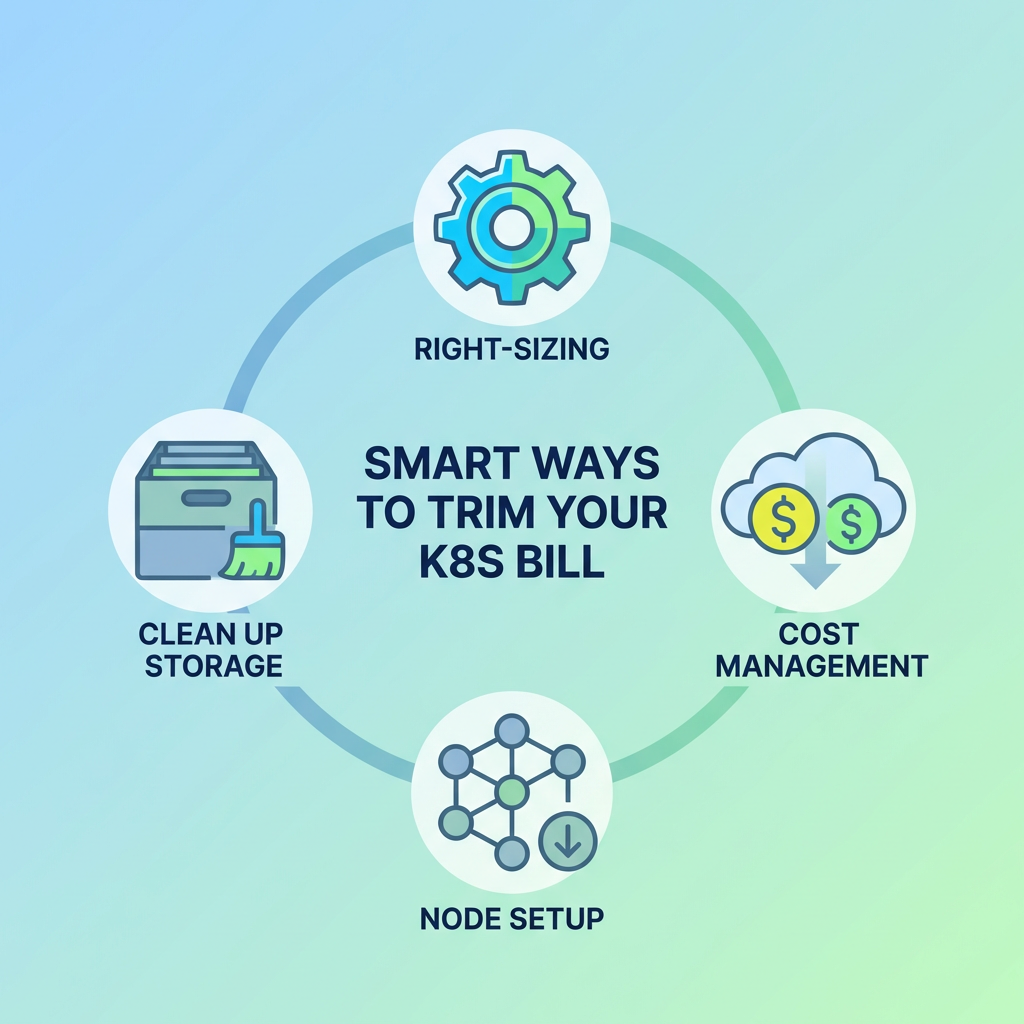
Smart Ways to Trim Your K8s Bill

Smart Ways to Trim Your K8s Bill

Right-size Your Pods

First, start with the basics. Check what your pods actually use versus what they request. Most teams set CPU and memory requests too high out of fear. But this caution costs money.

Look at usage data over 2-3 weeks. Then adjust pod requests to reflect reality, not worst-case scenarios. This simple step often cuts costs by 30-40%.

Fix Your Node Setup

Nodes matter a lot, too. You can start with a smart mix. Use cheaper spot instances for jobs you can lose. And use standard nodes for work you cannot lose. AWS Spot, Google’s Preemptible VMs, and Azure Low-Priority VMs can cut costs by up to 90% for some workloads.

Also, you need to check your cluster count. Too many clusters can drain money fast. Each one can bring extra costs for control planes, monitoring, and networking. So try putting smaller projects into shared clusters.

Use Autoscaling Wisely

Tools like Horizontal Pod Autoscaler and Cluster Autoscaler can also help match resources to demand. But they need a proper setup. 

Set smart scaling rules based on real traffic patterns. Add buffer time before scaling down to prevent flip-flopping. And don’t forget to check if autoscalers actually work as planned, because many teams set them up and never look back.

Clean Up Your Storage

Old volumes, snapshots, and backups can stealthily and unnecessarily drain your budget, so set up regular cleanup jobs to find and delete:  

  • Unused persistent volumes  
  • Unneeded older snapshots  
  • Logs and data from services that have been deleted  

Also, make sure to select lower-cost storage classes for data that is rarely accessed, as items do not always need to be on the fastest SSDs.

Track Costs by Team

You can also make costs visible to everyone. Organize resources by team, project, and app, using tags. Then demonstrate to each group what they have spent. 

This basic action will impose a requirement to better itself. No one aspires to be the team that wastes the most money. Everyone can pretend the problem lies elsewhere if there are no ways to track the cost.

Beyond Manual Tweaking

Manual tuning is helpful, but only to a point. For greater savings, consider:  

  • AI tools that predict resource needs based on usage patterns  
  • Policy tools that prevent wasteful practices before they start  
  • Autonomous systems that make real-time adjustments to your resource allocation  

The best configurations incorporate human oversight along with intelligent automation. For this reason, it is essential to keep engineers focused on higher-value work while your systems do the more tedious aspects of cost management.

GitHub Actions vs GitLab CI vs Jenkins: What to Choose

GitHub Actions vs GitLab CI vs Jenkins

Have you ever found yourself stuck in an endless cycle of manual builds and testing? CI/CD tools can take that load off your plate. They can help you automate testing and deployment. So your code moves forward with less manual work. And choosing the right tool can still be tricky. Here are three solid options to compare: Jenkins, GitLab CI, and GitHub Actions.

What Are CI/CD Tools?

CI/CD tools help you ship software smoothly and consistently. You push code changes. Then the tool runs a set of steps right away. It builds your app and also runs tests. It can also flag errors before they reach users. That can save you from last-minute panic. 

Jenkins

Jenkins is a classic tool. Many teams use it because it is proven. You can shape it to match your workflow. And you can also make it do even more jobs with the help of plugins.

Pros

  • It’s completely free and open-source
  • There are tons of plugins. It was over 1,500 at last count!
  • Works with almost any coding project
  • You can run it anywhere. It could be your laptop, server, or even cloud

Cons

  • Setting it up also feels like solving a puzzle
  • It also needs regular maintenance 
  • The interface looks straight out of 2005
  • It might need its own server to run well

Jenkins shines for teams that need many custom options or have specialized security needs. It’s very flexible but requires more attention than newer tools.

GitLab CI

GitLab CI comes built into GitLab’s platform. 

Pros

  • It can blend smoothly with GitLab’s other features
  • Simple setup if you’re already using GitLab
  • It uses easy YAML files to set up pipelines
  • Comes with built-in runners to execute your code

Cons

  • Only really makes sense if you use GitLab
  • Its advanced features can cost money
  • Fewer plugins than Jenkins
  • It can also get pricey as teams grow

GitLab CI works best for teams already using GitLab who want a no-fuss solution. Code, issues, and CI/CD all live in one place, which makes life simpler.

GitHub Actions

GitHub Actions joined the party in 2019 but quickly became popular. It’s fresh, sleek. It fits right into GitHub.

Pros

  • Lives directly in your GitHub repos
  • Marketplace full of pre-made actions
  • Super easy to set up with YAML files
  • Free for public repos and some private usage

Cons

  • It can get expensive for heavy usage
  • It is still growing its ecosystem
  • Customization is also limited compared to Jenkins

GitHub Actions are great for open-source projects or teams already deep into GitHub. The tight integration means less jumping between tools.

Head-to-Head Comparison

Ease of Use:

GitHub Actions takes the cake here. Its simple setup and tight GitHub integration make it beginner-friendly. GitLab CI comes second, and Jenkins comes last with its steeper learning curve.

Flexibility:

Jenkins wins the flexibility contest hands down. It can do almost anything with the right plugins. GitLab CI also offers good customization within its ecosystem, and GitHub Actions provides solid options, but it has some limits.

Price:

Jenkins costs nothing except the server to run it on. GitHub Actions is free for many uses, but it can also add up quickly. GitLab CI starts free but requires paid plans for bigger teams.

Community Support:

All three have strong communities. But Jenkins has the biggest head start. It’s been around for. And so you’ll find more for you, guides, and plugins when you get stuck.

How to Choose?

Ask yourself these questions:

  • Where does your code already live?
  • How much customization do you need?
  • What’s your budget?
  • How much time can you spend on setup?

Start with GitHub Actions if your code is on GitHub. It fits right in. If you use GitLab, stay with GitLab CI. It feels built in because it is. And if you need deep control or special needs, Jenkins can be worth the extra setup time. 

You can’t go terribly wrong with any of these options. They all handle the basics well. So pick the one that matches your team. Then start automating today.

Docker to Kubernetes: A Practical Migration Checklist for Dev Teams

Docker to Kubernetes Migration

Are you ready to take your app from local containers to cloud-native work? If yes, you need to know that moving from Docker to Kubernetes is more than a simple tech swap. Once you have moved in, you gain more control and room to grow. Now let’s break the move into simple steps your dev team can follow.

Why Move From Docker to Kubernetes?

Docker vs Kubernetes

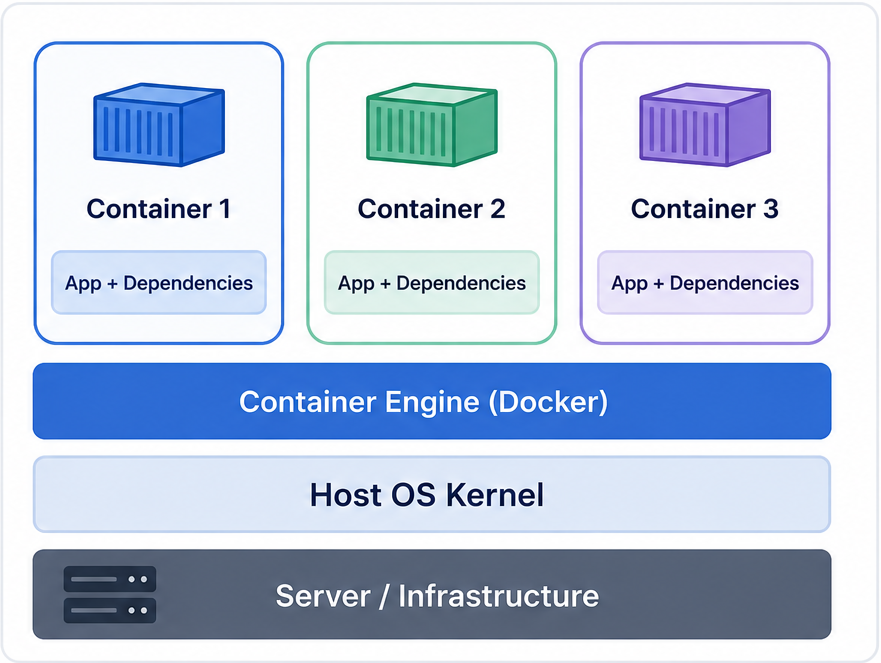
Docker works great for packaging apps into neat little containers. But on its own, Docker has so many limitations. It runs on just one machine, and if that machine crashes, your app goes down too. And that can ruin the whole setup.

This is where Kubernetes comes in. It fixes this by spreading your containers across many machines. It also

  • Heals itself when things break
  • Scales up or down automatically
  • Updates apps without downtime
  • Manages network traffic smartly

Pre-Migration Checklist

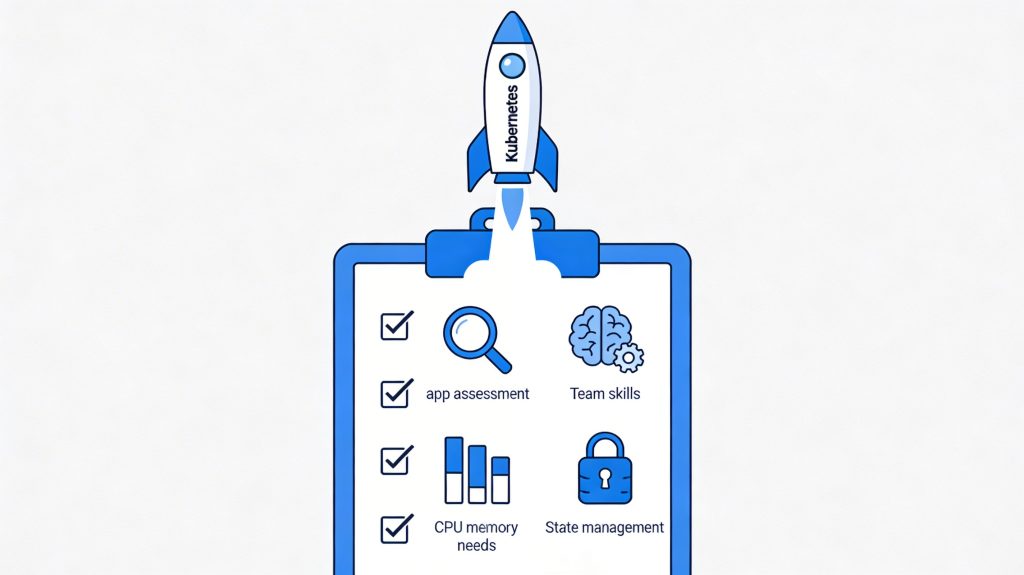
Docker to Kubernetes migration checklist

You need to check if you’re ready before jumping in:

App Assessment: First, you need to determine whether your app even needs Kubernetes. Because small apps with few users might do fine with just Docker.

Team Skills: Do you have team members who know how to run Kubernetes? And if not, you need to budget time for learning.

Resource Needs: You should also list out CPU, memory, and storage needs. And that should be for each part of your app.

State Management:  Figure out how you’ll handle data that needs to be stored. You might even end up needing an extra database.

Step 1: Containerize Everything

First, make sure all parts of your app run well in Docker:

  • Check that your Dockerfiles follow best practices
  • Use smaller base images when possible
  • Put config info in environment variables and not hardcoded
  • Test each container thoroughly before moving on

Step 2: Create Kubernetes Resource Files

Now translate your Docker setup into Kubernetes language:

  • Pods: These hold your containers
  • Deployments: Control how pods run and update
  • Services: Help pods talk to each other
  • ConfigMaps/Secrets: Store settings and secret stuff

Here’s a basic deployment example:

yaml

apiVersion: apps/v1

kind: Deployment

metadata:

  name: myapp

spec:

  replicas: 3

  selector:

    matchLabels:

      app: myapp

  template:

    metadata:

      labels:

        app: myapp

    spec:

      containers:

      name: myapp

        image: myregistry/myapp:1.0

        ports:

        containerPort: 3000

Step 3: Set Up Your Registry

Kubernetes needs to grab your images from somewhere:

  • Push your Docker images to a registry (Docker Hub, AWS ECR, etc.)
  • Make sure your Kubernetes cluster can access this registry
  • Use image tags smartly and also avoid using “latest.”

Step 4: Configure Networking

Help your app parts talk to each other:

  • Create Services for each component
  • Decide how traffic gets in (Ingress or LoadBalancer)
  • Set up network policies if you need extra security

Step 5: Plan for Data

Containers come and go, but data should stay put:

  • Set up PersistentVolumes for databases
  • Back up data before migrating
  • Test data recovery processes

Step 6: Deploy in Stages

Don’t move everything at once:

  • Start with non-critical parts of your app
  • Use a staging environment first
  • Try blue/green deployment to switch traffic gradually
  • Keep your Docker setup running until Kubernetes proves itself

Step 7: Monitor Everything

Keep an eye on your new setup:

  • Set up logging with tools like ELK or Loki
  • Add metrics with Prometheus
  • Create dashboards in Grafana
  • Set alerts for when things look weird

Common Challenges to Watch For

You might hit bumps even with planning:

  • Resource Limits: Set CPU and memory limits for each container
  • Config Issues: Double-check environment variables and secrets
  • Persistent Storage: Test volume mounts thoroughly
  • Network Problems: Check Services and DNS settings if pods can’t find each other

Final Checklist

Before calling it done:

  • Can your app scale up and down?
  • Does it restart itself when something crashes?
  • Can you update without downtime?
  • Is monitoring giving you useful info?
  • Can new team members understand the setup?

Moving from Docker to Kubernetes takes work. But it’s worth it. You get a steadier app and smoother scaling when traffic spikes. And you spend less time babysitting containers.

Kubernetes also presents several opportunities for developers. Those skills come with lots of job opportunities.

Using Kubernetes can make you feel like the system administrator you always wanted to be. Start by picking just one service. You’ll learn a lot from that first one. After that, the options feel endless. You’ll wonder how you ever managed without it.

Platform Engineering: Building Internal Developer Platforms (IDPs) That Scale

How Platform Engineering Helps Scale

Have you noticed how “Platform Engineering” is everywhere lately? You may hear it in meetings or even see it in posts. And it often comes with one big idea: building Internal Developer Platforms (IDPs). The idea is simple. Teams want building software to be easier, not harder. Let’s break it down into plain terms without getting too technical. 

How Did We Get Here?

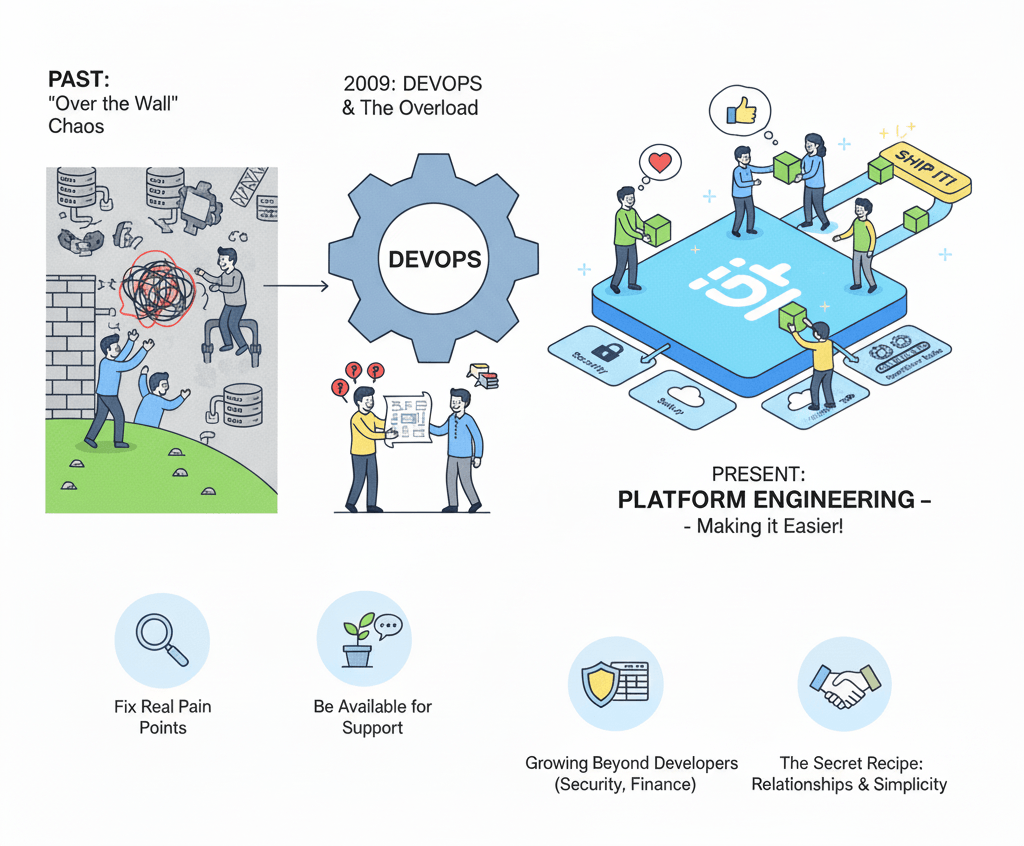
In the past, developers wrote code and handed it to operations teams, who had to figure out how to run it. This “over the wall” approach caused tons of delays and finger-pointing when things broke.

Then came DevOps around 2009. The big idea was simple: to get developers and operations people working together. Developers began taking responsibility for their own code in production. It sounds good in theory, but there are limitations.

But here’s what actually happened: developers got stuck with too much extra work. They had to learn cloud platforms, security, and tons of new tools. Teams developed their own approaches to deploying code. And this sometimes led to hundreds of distinct approaches within a single company. And that caused significant operational disruption. 

Enter Platform Engineering

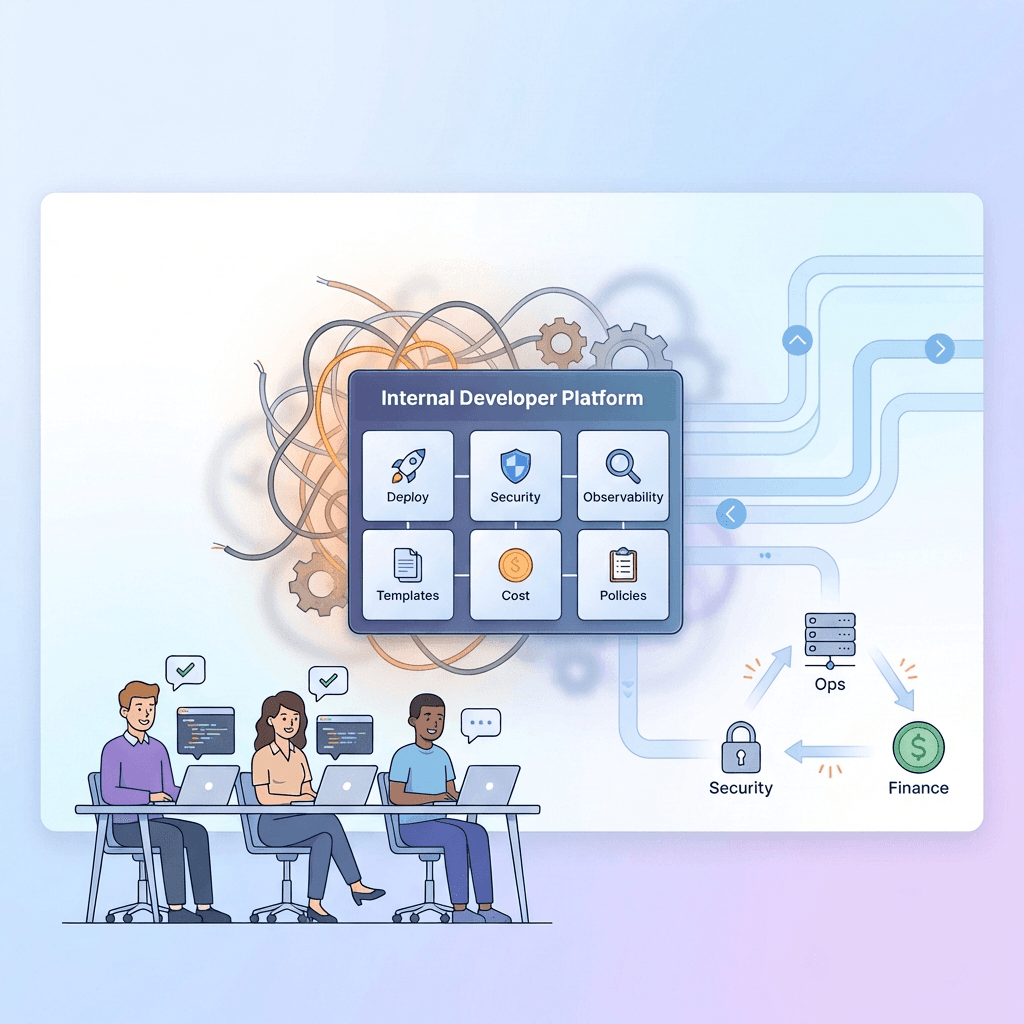
Platform engineering solves this overload problem by providing a shared platform that handles the hard parts. It can handle setup, security, and the boring repetitive work. So you can focus on writing good code and shipping it.

Building an IDP That Developers Actually Want

The key to a successful Internal Developer Platform is to build something developers love. It should not be something they’re forced to use. Here’s how:

Fix Real Pain Points First

Start by asking: “What tasks do developers hate doing?” Maybe it’s setting up new projects or fixing broken deployments at 2 AM. Solve these headaches first, and the rest will be easy.

Start Small

Don’t try to build everything at once. First, pick one problem, solve it well, and then add more features. Be honest about what your platform can’t do yet. Developers respect honesty more than promises.

Be Available for Support

Developers using your platform will often hit roadblocks. And so be there to help! Every problem they share is an opportunity to improve your platform.

Stay Super Transparent

You will also need to show your progress openly. Sometimes you should also invite developers to see what you’re working on. You can also conduct brief weekly chats to discuss challenges and wins. This can build trust and get you helpful feedback.

Growing Beyond Developers

Other teams will want in if your platform succeeds. For example, security teams will need to add scans and policies. Finance teams will also want cost tracking features.

You can help these teams work with developers smoothly. Nobody likes surprise rules or blocks that appear without warning.

The Secret Recipe

The best platforms solve more problems than they create. Technical tools matter less than you might think. Using Kubernetes or CI/CD tools won’t save a platform that doesn’t meet real needs.

Focus on relationships with your developers, listen to them, and make their lives easier. Keep things simple when possible.

Do this right, and you won’t just have a platform, but you’ll also have a tool that transforms how your company builds software.

The Evolution of CI/CD: A Guide for 2025 DevOps

DevOps

Continuous Integration and Continuous Delivery (CI/CD) has been a game-changer in the world of software development, especially within the DevOps framework. Looking ahead to 2025, we need to understand the path for CI/CD practices to improve software delivery processes for organizations. In this guide, we examine the key developments and trends in CI/CD that will shape the industry in the coming years.

1. The Foundations of CI/CD

The traditional software development model featured long release cycles and siloed teams, and CI/CD emerged as a response to that. Agile methodologies opened up doors to faster iterations and more collaborative environments. Continuous Integration is about automatically merging code changes into a shared repository, testing them, and receiving feedback immediately. Continuous Delivery takes this one step further by ensuring that the code is always in a deployable state, enabling more frequent releases with minimal manual intervention.

2. Automation at the Core

As 2025 approaches, automation remains the heart of CI/CD practices. Automation tools have been integrated into the system to reduce human error and enhance efficiency. As a result, automated testing frameworks are essential for running tests continuously in the CI pipeline. By speeding up the development cycle, this change also improves code quality by finding these problems earlier in the lifecycle.

3. The Rise of DevSecOps

The Rise of DevSecOps

As security takes center stage in software development, the adoption of security practices into CI/CD pipelines (DevSecOps) is on the rise. By weaving security checks into every stage of the development process, rather than only at the end, organizations can better avoid delivering vulnerable code to production. Taken proactively, it not only helps to save the applications but also cultivates a shared security responsibility culture amongst the development, operation, and security teams.

4. Cloud-Native Technologies

With the rise of cloud native technologies, the way we build and manage CI/CD pipelines is changing. Containerization is made easier with tools like Kubernetes and Docker, enabling developers to build consistent environments from development to production. It helps to reduce deployment issues and scale. As more organizations move to cloud platforms, the use of cloud-native CI/CD tools will become essential to achieve the highest levels of efficiency and flexibility.

5. AI and Machine Learning Integration

Combining Artificial Intelligence (AI) and Machine Learning (ML) will transform CI/CD practices by enabling predictive analytics and automated intelligence. These methods can then analyze historical data to process future bottlenecks or failures before it is too late. Furthermore, AI-powered tools can streamline the testing process by highlighting high-risk areas that require more comprehensive testing.

6. Enhanced Collaboration Tools

CI & CD

Successful CI/CD implementations keep collaboration as a crucial part. With the increasing prevalence of remote work, communication and collaboration tools for distributed teams have become crucial. As platforms integrate version control, issue tracking, and project management, it will become increasingly important for each team member to be aligned throughout the development lifecycle.

7. Focus on Observability

With the continued maturation of CI/CD practices, observability, or the ability to monitor applications in real time to learn about performance and user experience, is becoming increasingly important. Observability enables teams to embed it into CI/CD pipelines, enabling them to quickly identify issues post-deployment and iterate based on user feedback. In fast-paced environments, this continuous loop of monitoring and improvement will be vital to keep high-quality applications.

Conclusion

Now that we have entered 2025, the evolution of CI/CD will continue to influence programming going forward. Automation is at the heart of it, along with improved security practices through DevSecOps, cloud-native technologies, AI integration, better collaboration tools, and observability to facilitate the software delivery process and maintain high quality and security. Teams that wish to survive in an ever-more competitive landscape where speed and reliability are paramount will need to embrace these trends.

An Introduction to Quantum Computing for Developers: What’s Next?

Quantum Computing

The field of software development is about to be revolutionized by quantum computing, which can do things no traditional computer can. As developers begin exploring this cutting-edge technology, it is important to understand the principles and possible applications so you can stay relevant in a rapidly changing tech landscape. In this article, we will introduce quantum computing to developers and explore what the future holds in this exciting field.

Understanding Quantum Computing

Quantum computing is, at its heart, the use of quantum mechanical principles to process information. Classical computers use bits as the smallest unit of data (representing a 0 or 1), whereas quantum computers use qubits. But Qubits can maintain superposition, enabling quantum computers to perform complex calculations that are unavailable to their classical counterparts. A qubit can be entangled, or share its state with other qubits, even over large distances. The unique property of being able to solve particular problems more efficiently than classical systems due to the probabilistic nature of their results.

Programming for Quantum Computers

Programming for Quantum Computers

For someone who’s used to the current development world, moving into quantum computing is a change, and you have to learn how to program in these new paradigms and new languages. Several frameworks have emerged to facilitate this transition:

Qiskit: a quantum computing framework developed by IBM using Python that enables developers to write quantum algorithms. It offers libraries for building and simulating quantum circuits, which are familiar terrain for Python programmers.

Q#: Microsoft’s Q# is a language for developing quantum algorithms, baked right into classical programming languages like C#. Hybrids that focus on applications combining quantum and classical computing capabilities are emphasized.

Cirq: Cirq, another Python library, is also developed by Google to create and optimize quantum circuits for Google’s quantum processors. For developers interested in building algorithms that address real-world problems, it is particularly helpful.

Cirq

In addition to making quantum algorithm development easier, these frameworks also provide a means to simulate and test algorithms before they are deployed on genuine quantum hardware.

Potential Applications

There are many and varied potential applications of quantum computing. This technology is poised to benefit several industries, including finance, healthcare, logistics, and cryptography. For example:

Cryptography: This opens the potential for quantum computers to break traditional encryption techniques and instigates the need to develop cryptographic techniques resilient to quantum attack.

Drug Discovery: Advances in medicine and breakthroughs, thanks to quantum computing, which can simulate molecular interactions at unprecedented scales to accelerate drug discovery.

Optimization Problems: Quantum algorithms enable solving optimization problems, which are critical for industries dependent on complex optimization problems, such as supply chain management and logistics, much faster than classical algorithms.

Challenges Ahead

However, several obstacles need to be overcome before quantum computing becomes commonplace. Error rates in qubit operations are a major hurdle. The fact that quantum systems are highly sensitive to their environment leads to incorrect calculations. Error correction techniques are essential for reliable quantum computation, and robust techniques need to be developed.
Moreover, quantum mechanics is a steep curve to learn and understand, and its implications for programming are significant. To become experts, developers will need access to educational resources and hands-on experience with quantum systems.

Conclusion

Looking ahead, quantum computing will be a must for developers who want to stay ahead of the curve. Understanding the fundamental principles of quantum mechanics and becoming familiar with programming frameworks such as Qiskit and Q# will help developers prepare for what’s coming. Quantum computing is not just another skill to learn; it’s a transformative journey that could change how we solve problems across many industries. As we continue to develop this knowledge and practical applications become more widespread, developers who invest in it will be well-positioned to lead in the next era of computing innovation.

Exploring the Future of AI-Assisted Software Development

f AI-Assisted Software Development

Artificial intelligence is fast changing the landscape of software development, changing how developers create, test, and deploy applications. AI assisted software development is not a trend, it’s a paradigm shift in the industry that allows developers to work faster and produce better code. In this article, we explore the future of AI-assisted software development, including the benefits, challenges, and tools driving this new era.

The Rise of AI in Development

The software development lifecycle has become increasingly integrated with AI technologies. These AI tools are meant to improve developer productivity: from automating basic tasks to supplying intelligent code recommendations. These tools use machine learning and natural language processing to learn coding patterns and help developers while they code. This way, developers can concentrate on more difficult issues, shortening the period of project execution and enhancing creativity.

Enhancing Productivity

Enhancing Productivity

The most important advantage of AI-assisted development is the productivity boost it provides. GitHub Copilot and Tabnine are tools that provide context-aware code suggestions, helping developers write code faster and with greater accuracy. These tools predict what a developer will do next, reducing the time spent on repetitive tasks and the frequency of mistakes. This efficiency enables teams to spend more time on the really important parts of a project, like architecture and user experience design.

Additionally, AI can test automatically with tools such as CodiumAI that automatically build unit tests from code changes. Besides speeding up the testing phase, this automation also improves code quality by providing more thorough coverage and proper testing status, and by detecting potential bugs early in the development cycle.

Improving Code Quality

The use of AI tools helps improve code quality by identifying vulnerabilities and suggesting best practices. For example, Amazon CodeWhisperer scans your code for security vulnerabilities and tells you what needs fixing. It helps developers maintain high-quality standards and reduces the risk of security breaches.

Additionally, AI-based code review tools can detect errors resulting from a lack of proper style guidelines and best practices by analyzing code and ensuring that everyone on the team adheres to the same coding standards. These tools help deliver more maintainable, reliable software by catching issues before they reach production.

Facilitating Collaboration

With the rapid increase in distributed development teams, collaboration tools fueled by AI are essential to productivity. Developers can save and share code snippets on platforms like Pieces and receive context-aware suggestions based on what they have interacted with previously. Having this knowledge base in common enables your teammates to work together no matter where they are in the world.

Additionally, AI can automate project management processes, such as creating sprint reports and tracking progress. Stepsize AI integrates with issue trackers, providing real-time status updates on development progress so everyone stays in the loop.

Challenges Ahead

While the advantages of AI-assisted software development are plentiful, there are still obstacles. The concern is that AI tools are being over-relied on, and developers are losing the fundamental coding skills. Critical thinking and problem-solving are as important as tool usage in adapting education programs.

Another challenge is the use of AI tools that require access to the source code repository to work—how do you ensure data privacy and security? When using these tools, developers must be vigilant about the permissions they grant and check with their organizational policies.

Conclusion

The possibilities for supporting AI assistants in software development are promising, empowering developers to create more efficient coding solutions, improve code quality, and foster better collaboration with their teams. The development of AI technologies will only continue, so developers will need to embrace these tools and be aware of the problems they cause. Instead, developers should be deliberate and strategic when incorporating AI into their workflows, using it to deliver innovative solutions to the evolving demands of the digital space. With the promise of a new era of software development, the creative union of human and artificial intelligence will certainly push the limits of what is conceivable in software engineering.

Best Practices for Using Serverless Databases

Databases

As businesses move increasingly towards serverless architectures, it’s important to understand best practices for using serverless databases. However, serverless databases introduce unique challenges that it solves through scalability, reduced management overhead, and cost efficiency. Here are the best practices for developers to follow to achieve optimal performance and security when developing with serverless databases.

1. Understand the Serverless Model

Before we jump into implementation, it’s important to understand how serverless databases work. Traditional databases want you to manually provision and manage servers; serverless databases automatically scale up or down to meet demand. This means developers don’t have to worry about the underlying infrastructure when building applications. If you’re using a serverless database, familiarize yourself with the features of the one you choose (relational or NoSQL) to be able to take advantage of it.

2. Optimize Data Access Patterns

Data access is important for performance in serverless environments. Serverless functions are stateless and ephemeral, so it’s important to optimize how your application interacts with the database. To minimize database calls, use batch operations and cache frequently accessed data to reduce latency. Additionally, by implementing read replicas, performance can be boosted through spreading read requests across more instances.

3. Implement Proper Security Measures

Serverless databases are all about security. With Identity and Access Management (IAM) policies, ensure that you have set strict access controls. Give the least privilege it needs to complete its functions to achieve this. In addition, sensitive data should always be encrypted in transit and at rest to prevent such threats.

4. Monitor Performance and Usage

Since a serverless environment allocates resources dynamically, it’s critical to monitor what is happening. Monitor database performance metrics like query execution time, error rate, and resource utilization using monitoring tools. With this data, you can identify bottlenecks and optimize your queries. Alerts can also be set up for unusual activity to catch situations that may escalate before they do.

5. Manage Cold Starts

Cold starts occur when you start a serverless function that has been idle for a while, and there is more latency than usual during initialization. This can be mitigated when loading by keeping functions warm with an interval job to schedule periodic invocations, or, depending on the cloud provider, using provisioned concurrency. If you follow this practice, user response times when interacting with your application will improve dramatically.

6. Plan for Scalability

Best Practices for Using Serverless Databases

One of the main advantages of serverless databases is that they can scale themselves depending on demand. But it’s important to build your application with scalability in mind from the get-go. Imagine how your data model will behave under high load and use sharding or partitioning techniques to appropriately distribute the data across instances.

7. Use API Gateways Wisely

Serverless functions can be protected by an additional security and management layer provided by API gateways, which act as intermediaries between clients and your serverless functions. If your application uses a serverless DB, make sure your API gateway handles authentication, rate limiting, and input validation effectively. It also guards your database against abusive requests and prevents legitimate ones from being affected too severely.

8. Regularly Review Costs

Serverless databases are on a pay-as-you-go model, so without close monitoring, you can end up with unexpected costs. Always review your database operations usage patterns and costing to identify savings opportunities. You can implement budget alerts or limits to prevent overspending.

Conclusion

Serverless databases are scalable, cost-effective, and have low overhead management. But developers must follow best practices to overcome the challenges of this architecture. Having a clear understanding of what serverless models look like is key to optimizing data access patterns, implementing secure access, monitoring performance, managing cold starts, building for scalability, integrating with well-chosen API gateways, and regularly reviewing costs when you’re developing applications on serverless databases in 2025 and beyond.
Automating Your Development Workflow with GitHub Actions

GitHub Actions

GitHub Actions can help automate your development workflow, making it much more productive and streamlined. GitHub Actions is a powerful continuous integration and continuous delivery (CI/CD) platform that allows developers to automate their workflows directly in their repositories. In this article, we will explore how to use GitHub Actions to build an effective development workflow.

Understanding GitHub Actions

With GitHub Actions, you can automate your workflows based on events in your repository. These workflows are defined by YAML files in your project’s .github/workflows directory. A workflow consists of one or more jobs that can be run sequentially or in parallel as needed. Steps of a job execute commands or actions, giving you a lot of control and flexibility to automate your processes.

Setting Up Your First Workflow

To begin with GitHub Actions, create a new workflow file. You can either do this through the GitHub interface or by creating a YAML file. Once you have the file set up, you can define the events that will trigger the workflow. Common triggers include pushes to branches, pull requests, and even scheduled events. Take, for example, you can configure a workflow that runs tests any time code is pushed to the main branch.

Defining Jobs and Steps

You can define multiple jobs that do different tasks within your workflow. Each job gets its own environment, e.g., a virtual machine or a container. Isolation enables better resource management and parallel job execution. Each job has steps that can run scripts you define or run one of the prebuilt actions from the GitHub Marketplace.

For example, such a job might include steps such as checking out code from the repository, setting up the environment (e.g., installing dependencies), running tests, and deploying the application if all tests pass. When you break tasks into smaller steps, you can easily see where things go wrong during execution.

Using Actions from the Marketplace

There is a huge ecosystem of reusable actions in the GitHub Marketplace for GitHub Actions. They include everything from sending notifications to deploying applications on different platforms. Using these prebuilt actions, developers can save time and reduce code duplication in their workflows.

For example, if you want to send a notification when a deployment is successful, you don’t need to write custom code from scratch; there is an action for that. It also means development is sped up and best practices are followed.

Monitoring and Debugging Workflows

Your workflows are only as effective as you monitor them. Each workflow run on GitHub includes detailed logs so developers can track progress and quickly get to the bottom of any issues. Should a step fail, you’ll know what went wrong from the logs and will be able to fix it and get moving again.

Monitoring and Debugging Workflows

Moreover, workflows on GitHub Actions can be triggered manually for testing. With this feature, developers can run workflows without waiting for specific events, enabling faster debugging and iteration.

Best Practices for Using GitHub Actions

To maximize the benefits of GitHub Actions in your development workflow:

Keep Workflows Modular: We, as humans, need to break linear, complex workflows into smaller, reusable pieces.
Use Caching: Caching strategies improve dependency installation and build times.
Version Control Your Actions: So specify versions for actions used in your workflows to avoid unexpected changes.
Secure Your Secrets: Keep sensitive information such as API keys where they belong, managed by GitHub Secrets.

Conclusion

A good way to increase your development workflow productivity is to use GitHub Actions to automate your workflow. Once developers understand how to create workflows, set jobs, and steps using marketplace actions, they can use them extensively to improve their CI/CD pipelines. Automation is becoming increasingly important in today’s development practices, and learning how to use GitHub Actions will be invaluable for any developer trying to get the most out of their workflow.

Essential Techniques Every Developer Should Know for Optimizing Web Performance

Optimizing Web Performance

Whether you want to provide your users with a great experience or rank higher in search, optimizing web performance is a must. As sites become more complex, developers use many tricks to ensure they load quickly and efficiently. In 2025, here are essential techniques every developer should know to optimize web performance.

1. Optimize Images

A large portion of any webpage’s load time is often taken up by images. Images should be compressed without loss of quality to improve performance. Using more modern formats, such as WebP, can help even more, and tools like TinyPNG or ImageOptim can reduce file size if nothing else can be done to speed up loading times. Also, responsive images with the srcset attribute let browsers choose the right image size for the device resolution, speeding up loading on mobile devices.

2. Minify and Combine Files

Minify and Combine Files

Minification is the process of reducing the character count of HTML, CSS, and JavaScript files, making them smaller and loading more quickly. This process can be automated using tools such as UglifyJS and CSSNano. Reducing the number of HTTP requests made by the browser is especially useful for mobile users with limited bandwidth and is achieved by combining multiple files into a single file. Using this technique speeds up resource loading and improves overall site performance.

3. Leverage Browser Caching

Browser caching is the ability of a web browser to store static resources locally so it doesn’t have to fetch them from the server on subsequent visits. Developers can control how long ago resources should be cached by setting appropriate cache-control headers. This technique dramatically reduces page load times for returning visitors, as their browsers can fetch cached files, rather than new requests to the server.

4. Use Content Delivery Networks (CDNs)

Content Delivery Networks (CDNs) distribute a website’s content across servers in different parts of the world. CDNs deliver content from locations closer to the user to reduce latency and improve load times. And it’s particularly useful for sites servicing a global audience, because it helps deliver your assets—images, stylesheets, scripts, etc.—faster.

5. Enable Gzip Compression

Enable Gzip Compression

Gzip compression compresses text-based resources, such as HTML, CSS, and JavaScript files, before they are sent over the network. Gzip compression is easy to enable on modern servers, as most modern web servers support it. Compressing these files allows developers to reduce load times and improve overall site performance.

6. Minimize Redirects

Additional HTTP requests that redirects involve can slow down page load times. Wherever possible, developers should keep redirects to a minimum and ensure that URLs in data entry interfaces are accurate and up to date. Regularly auditing redirects on a website helps identify unnecessary ones that can be removed to simplify navigation.

7. Optimize Code Execution

Code execution is important to improve web performance. Important content should be loaded first, and unimportant scripts should be deferred until after the main content has loaded. This approach increases perceived performance and allows users to see meaningful content quickly.

8. Monitor Performance Regularly

Monitor Performance Regularly

You need to regularly review your website performance to identify bottlenecks and areas for improvement. Tools like Google Lighthouse and GTmetrix can help you see how fast your site is loading, how you’re using resources, and the overall health of your site. These metrics help developers make data-driven decisions about optimizations that will give you the biggest bang for your buck.

9. Limit Third-Party Scripts

Third-party scripts can enhance functionality (analytics, social sharing, etc.), but they also increase load times. Developers should also assess the need for each script and eliminate those that do not contribute to delivering value to the user experience. Also, loading third-party scripts asynchronously will prevent them from blocking other critical resources.

Conclusion

Optimizing web performance remains a core component of web development, with direct repercussions for user experience and engagement in 2025. By implementing image optimization, file minification, browser caching, using CDNs, Gzip compression, limiting redirects, optimizing code execution, regularly monitoring performance, and limiting third-party scripts, Developers can create a fast-loading website that delights users and stands out in a more competitive digital world. By practicing these, web applications will not only run well but also provide a good experience for all users.

Worth a Read

Advertisement

In the Spotlight

Caching

Modern Caching Techniques for High-Performance Web Apps

In the web development world, modern caching techniques have become indispensable to build high performance web applications. It’s operations like…

blockchain technology

Exploring the Intersection of Blockchain and Web Development

Blockchain technology and web development are converging in an exciting new frontier that will change the way we use digital…

How Platform Engineering Helps Scale

Platform Engineering: Building Internal Developer Platforms (IDPs) That Scale

Have you noticed how “Platform Engineering” is everywhere lately? You may hear it in meetings or even see it in…

DevOps

The Evolution of CI/CD: A Guide for 2025 DevOps

Continuous Integration and Continuous Delivery (CI/CD) has been a game-changer in the world of software development, especially within the DevOps…

Suggested for You

Popular Categories

Don’t Miss This

Quick Navigation